There's a reason some AI-generated images stop you cold while others feel flat and forgettable — the difference almost always comes down to light. For independent filmmakers building pre-visualization boards and concept designers crafting mood-rich illustrations, learning to write precise lighting prompts is the single fastest way to close the gap between imagination and output. Banana Pro AI gives creatives the multi-model generation engine to test, iterate, and execute those lighting visions without booking a studio or a cinematographer.
I. What Banana Pro AI Can Do for Your Cinematic Vision Right Now
Before diving into specific techniques, it helps to understand what you're actually working with. Banana Pro AI runs on a multi-model infrastructure — Midjourney, Seedream 5.0, Gemini Image, GPT Image 2, Flux, and others — all accessible from a single canvas. That matters for lighting work because different models handle atmospheric effects differently. Seedream tends to preserve soft luminosity transitions; Flux is aggressive with contrast and shadow definition; Gemini Image handles real-world lighting logic with photographic accuracy.
The platform's Canvas Workflow lets you run the same cinematic prompt through multiple models side by side, so you're not guessing which engine handles golden hour bokeh better — you see the comparison in seconds. For filmmakers who work fast and iterate constantly, that workflow removes a significant bottleneck.
Generation runs in 5–15 seconds, and every output comes with full commercial rights. For a concept artist turning around storyboard frames for a client pitch, or an indie director assembling a visual bible, that combination of speed and ownership changes what's practically possible on a tight schedule.
II. Golden Hour: The Warmth That Sells the Scene
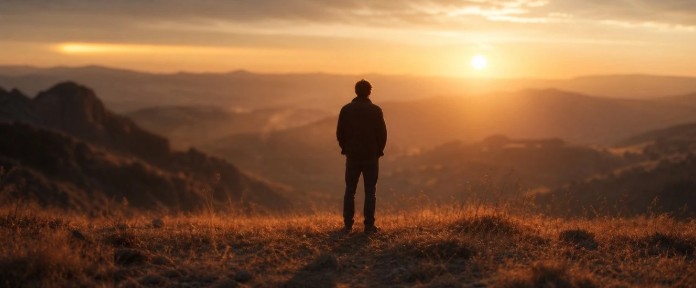
Golden hour — the 20-to-40-minute window after sunrise or before sunset — produces the most emotionally resonant natural light in cinema. The sun sits low, light travels through more atmosphere, and the result is warm amber tones, long dramatic shadows, and a softness that flatters every subject it touches. Terrence Malick built an entire visual identity around it. Chloé Zhao shot Nomadland almost entirely within it.
To recreate it in Banana Pro AI, the prompt structure needs to do three things: specify the color temperature, define the direction, and communicate the emotional register.
2.1 Basic Golden Hour Prompt Structure
A weak prompt says: "sunset lighting." A cinematic prompt says:
"warm golden hour backlight, sun at 15-degree elevation behind subject, amber and rose color cast, long soft-edged shadows stretching toward camera, shallow depth of field, 35mm film grain, cinematic color grading"
The difference is specificity. "Sunset" is a time of day. "Sun at 15-degree elevation behind subject with amber color cast" is a lighting setup. Banana Pro AI's models — particularly Seedream 5.0 and GPT Image 2 — respond well to angular descriptors because they're trained on photography metadata that includes camera and light positions.
2.2 Modifiers That Deepen the Effect
Add these to any golden hour prompt to push the cinematic quality further:
"lens flare cutting across upper left frame" — introduces the organic imperfection of real glass
"haze in midground, light scattering through dust particles" — adds atmosphere and depth separation
"silhouette rim light separating subject from background" — classic backlit composition technique
"bleach bypass color grade" — desaturates midtones while preserving highlight warmth, a hallmark of 1990s film stock looks
Run these variations through the Canvas Workflow in Banana Pro AI and you'll have a coherent set of reference frames within minutes, not hours.
III. Volumetric Lighting: Making Light Visible
Volumetric lighting — also called god rays, crepuscular rays, or light shafts — occurs when light passes through a medium (fog, dust, smoke, water vapor) and becomes visible as a beam or cone of illumination. Cinematographically, it signals scale, mystery, and the sacred. Think of the shaft of light hitting the briefcase in Pulp Fiction, the dusty attic beams in A.I. Artificial Intelligence, or virtually any interior shot in Barry Lyndon.
For concept designers working in sci-fi, fantasy, or gothic aesthetics, volumetric light is a foundational visual vocabulary element.
3.1 Writing Volumetric Light Prompts
The model needs to understand both the light source and the scattering medium. A precise prompt might read:
"volumetric light shafts streaming through high windows into a dusty warehouse interior, god rays with visible particle scatter, strong contrast between illuminated beams and deep shadow, cinematic color temperature 3200K warm, low camera angle looking up toward light source"
Several elements are doing specific work here. "Visible particle scatter" tells the model the medium is present — without it, you may get implied depth without actual beam rendering. The color temperature note (3200K warm) keeps the light consistent with tungsten practical sources, which is important if the image will be used as production reference. The camera angle instruction shapes the composition, not just the lighting.
3.2 Combining Volumetric Light with Other Elements
Volumetric light works best in contrast. Pure volumetric scenes can look like screensavers — dramatic but empty. The cinematic move is to place a subject, architectural element, or environmental detail at the intersection of light and shadow:
"figure standing at the edge of a volumetric light shaft, half-illuminated, half in deep shadow"
"cathedral nave with god rays hitting stone floor, dust motes, single pew in foreground"
"sci-fi corridor with neon vapor light scattering through damaged pipe steam"
Banana Pro AI's batch generation can produce four to eight variations of a single volumetric prompt simultaneously, making it efficient to test different subject placements without rewriting from scratch.
IV. Advanced Lighting Setups: Rembrandt, Chiaroscuro, and Practical Sources
Beyond golden hour and volumetric effects, serious cinematographic vocabulary includes a handful of classical setups that every concept designer and filmmaker should be able to prompt precisely.
4.1 Rembrandt Lighting
Named after the Dutch master's signature technique, Rembrandt lighting features a single light source positioned 45 degrees above and to the side of the subject, creating a small triangular highlight on the shadowed cheek. It reads as intimate, psychologically weighted, and portrait-serious.
Prompt structure: "Rembrandt lighting, single tungsten key light 45 degrees above subject left, small highlight triangle on right cheek, rich shadow fill, deep brown and amber color palette, painterly texture, 85mm portrait lens compression"
4.2 Chiaroscuro
Chiaroscuro is the broader technique of extreme light-to-shadow contrast — the visual language of Caravaggio and the noir genre. It prioritizes drama over information, hiding as much as it reveals.
Prompt structure: "chiaroscuro lighting, 90% frame in deep shadow, single hard light source from top right, harsh edge shadow falloff, black background, subject partially obscured, high contrast monochrome base with amber tint"
4.3 Practical Source Lighting
Practical lighting means the light source is visible in the frame — a candle, a lamp, a phone screen, a neon sign. It's the realist mode, associated with handheld intimate cinema.
"single candle as only light source, warm flickering orange glow, soft falloff, deep shadows at edges of frame, face lit from below at 45 degrees, natural skin texture, shallow depth of field, grain from high ISO simulation"
On Banana Pro AI, the Gemini Image models handle practical source simulation with strong photographic accuracy — particularly for candle and window light scenarios — because they're trained on real-world photography at scale.
V. The Prompt Architecture That Actually Works
After testing dozens of variations, a repeatable structure emerges for cinematic lighting prompts. Think of it as five layers:
Light type — volumetric / golden hour / practical / Rembrandt / chiaroscuro
Source position — 45 degrees above left / backlit at 15-degree elevation / top right
Color and temperature — 3200K tungsten warm / cool blue overcast / amber and rose
Medium or atmosphere — dust particles / fog / smoke / clear air
Camera and lens context — 35mm film grain / 85mm portrait compression / anamorphic lens flare
Every layer adds information the model uses to narrow the visual space toward a specific cinematic outcome. Removing any layer introduces ambiguity — and ambiguity in AI generation usually means the model defaults to its most-trained, most-generic interpretation of the concept.
A complete example combining all five layers:
"golden hour backlight, sun positioned 20 degrees above horizon behind subject, warm amber and dusty rose color grade 3500K, light filtering through sparse eucalyptus leaves creating dappled shadow pattern on ground, anamorphic lens flare, 2.39:1 aspect ratio, 35mm film grain, cinematic"
That prompt gives a model like Seedream 5.0 or Midjourney enough constraints to produce something genuinely usable as production reference — not just "pretty," but specific.
VI. Building a Lighting Reference Library with Canvas Workflow
The most underused feature in Banana Pro AI for cinematic work is the Canvas Workflow — particularly for building systematic lighting reference libraries. Instead of running prompts one by one, the workflow lets concept designers and filmmakers chain outputs, run comparative tests, and save entire prompt sequences as reusable pipelines.
A practical setup for a filmmaker building pre-production visuals:
Place a Text-to-Image node with the golden hour backlight prompt
Connect it to a style transfer node set to "35mm analog film"
Branch the output into two parallel Image-to-Image nodes — one pushing toward warmer grade, one toward cooler
Save the entire pipeline as a named workflow for the project
The result is a four-output reference set that maintains lighting consistency across variations. For a concept designer working on a pitch deck or a visual bible, this kind of systematic generation replaces hours of manual illustration or expensive reference photography.
The Smart Asset Library in Banana Pro AI automatically saves every generation with its associated prompt — meaning the lighting recipes that work can be archived, revisited, and refined across projects without starting from memory.
VII. Conclusion: Light Is the Language — Learn to Write It
Technical knowledge of cinematic lighting has always separated directors of photography from people who just point cameras. That same separation now exists in AI image generation — and the gap is prompt literacy, not access to expensive tools.
Every independent filmmaker who can write "volumetric god rays at 3200K through warehouse dust" instead of "cool light effect" is operating with a fundamentally different creative toolkit. Every concept designer who knows the difference between Rembrandt and chiaroscuro — and can communicate that difference in a prompt — will produce reference imagery that actually serves a production.
Banana Pro AI is where that literacy meets execution: multi-model generation, side-by-side comparison, commercial rights, and a workflow that keeps pace with how visual creatives actually think — iteratively, comparatively, and fast.
The technology is already here. The question is whether the prompts directing it are as precise as the vision behind them.