The pressure on content creators to produce original, royalty-safe audio every single day has never been higher. Stock music libraries feel stale after the fifth use of the same corporate track. Hiring composers is out of budget for most solo creators. When an AI Music Generator promises to turn a sentence into a finished song within minutes, the practical question is not whether it sounds impressive in a demo video. It is whether the tool holds up under the relentless rhythm of a content calendar, day after day, across different formats and moods, without burning through time, credits, or creative patience. I decided to find out by building an entire week’s worth of audio assets using nothing but text prompts, paying attention to where the process felt like a genuine time-saver and where it introduced new friction.
Defining the Challenge and Setting the Stakes
I mapped out a realistic content schedule for a hypothetical creator producing short-form videos, a weekly podcast, and occasional promotional clips. The goal was to generate all original background music and audio branding for seven days without touching a traditional music library. The output needed to cover lo-fi study beats, upbeat unboxing tracks, a podcast intro that felt consistent across episodes, and a tense, cinematic backdrop for a product teaser. This range of moods and genres would immediately expose any stylistic shallowness in the AI model.
The Initial Uncertainty Around AI-Generated Consistency
One creator concern I hear repeatedly is whether AI music tools fall into repetitive patterns — the same chord progressions, the same synthetic sheen, the same emotional flatness across wildly different prompts. My test deliberately included contrasting demands to see if the platform could genuinely shift its sonic palette or if every track would carry an audible algorithmic signature. From a practical user perspective, consistency of quality matters more than isolated brilliance; a tool that delivers one great track and four mediocre ones does not solve a daily workflow problem.
How the Creation Flow Actually Unfolds on a Tight Schedule
The platform’s core generation flow is deliberately stripped down, which matters when you are racing against an upload deadline. Here is exactly what the process looked like each time I needed a new track, based on repeated use across the seven-day period.
Step One — Provide the Musical Idea in Plain Words
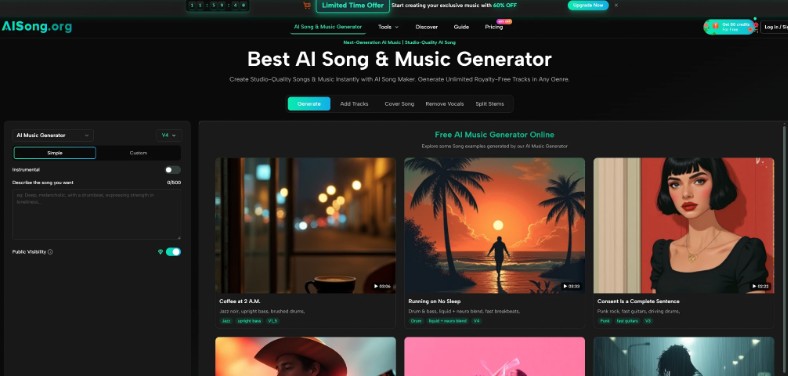
The interface presents a single input area where you type what you want. There is no complex menu of parameters, no required technical terminology. On Monday, needing background music for a product review, I typed “a calm acoustic guitar instrumental with a warm, inviting tone, suitable for a tech unboxing video.” On Wednesday, for the podcast intro, I entered “a short, energetic indie rock intro with punchy drums and a memorable guitar riff, around 30 seconds.” The AI accepts natural language and does not force you into pre-set genre tags or tempo fields.
Why Plain-Language Input Reduces the Daily Cognitive Load
When you are producing multiple pieces of content back to back, stopping to engineer a detailed prompt for every single audio track can feel like its own job. The platform’s tolerance for conversational descriptions — “something chill for a cooking video,” “epic orchestral swells for a trailer” — meant I spent less time thinking about how to talk to the AI and more time on the video itself. That said, I did notice that adding even one or two specific descriptive words noticeably sharpened the results. “Chill” produced background music that was pleasant but generic. “Chill lo-fi with soft rain sounds and a mellow piano melody” yielded something with more character and a clearer emotional center.
Step Two — Let the AI Assemble the Full Arrangement
After submitting the prompt, the platform processes the request through the selected AI model version. The model selection is straightforward, with multiple AI engine options that vary in output style and processing speed. In my daily testing, I primarily used the standard options available to a paid user, as the free tier’s shared queue would have introduced delays incompatible with a real production schedule. The generation begins streaming audio relatively quickly after submission, and the complete track appears in a personal cloud library without requiring local processing power.
What Arrangement Decisions the AI Makes Invisibly
Listening back to multiple generations across the week, it became clear that the AI was making structural decisions that a human producer would normally handle: instrumentation choice, tempo setting, verse-chorus dynamics, and the overall frequency balance. An upbeat pop track I generated for a social media clip automatically included a bridge section that dropped the percussion for a few bars before the final chorus, a technique that added genuine dynamics. The platform saves every generation automatically, so I could generate five takes of the same prompt and keep all of them for later comparison — a practical detail that turned out to be essential when my first take of the cinematic teaser track came back with an overly busy arrangement.
Step Three — Review and Download the Finished Track
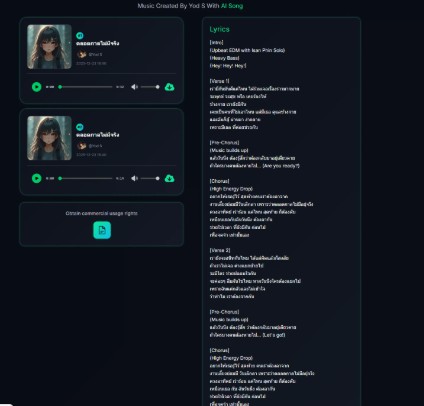
Once the generation is complete, the track sits in your library alongside all previous creations. Playback is immediate, allowing a quick quality check. If the result does not match what you imagined, you can generate another version with the same prompt or tweak the description. When satisfied, downloading is a single click and the file arrives as an MP3 ready to drop into any video editor or audio timeline. Paid plans include a commercial use license and the option to keep tracks private, which mattered for the client-facing promotional content I was simulating.
The Download Format and What It Means for Editing
The output is a stereo MP3 file. There is no option to download isolated vocal, drum, or instrumental stems. For my daily content test, this was not a blocker — I dropped the files directly into a video editor and they worked. For creators who want to customize the mix further, the lack of stem separation means you are stuck with the AI’s balance decisions. This is a trade-off worth understanding before committing to the platform for projects that demand post-production flexibility.
Three Real-World Content Scenarios Put to the Test
A feature list only tells part of the story. The real measure of a daily-use tool is how it performs under specific content demands, including the ones that trip up less flexible AI systems.
YouTube Tutorial Background Music
The task was generating a soft, unobtrusive instrumental that would sit behind voiceover without distracting the viewer. I prompted for “minimal electronic background music with a steady pulse, no sudden volume changes, and a neutral mood.” The generated track kept a consistent dynamic level throughout its four-minute duration, which made it easy to loop. The melodic content was subtle enough that it did not compete with spoken words. In my testing, simpler prompts for background music consistently outperformed requests for “interesting” or “complex” arrangements — the AI’s instinct to add musical interest sometimes worked against the purpose of staying in the background.
Weekly Podcast Intro and Outro Branding
Podcast branding requires repeatable consistency. I needed an intro that would sound recognizably the same across episodes, even if I generated it multiple times with the same prompt. Using the AI Song Generator in its music generation mode, I provided a detailed description of the desired intro — genre, tempo, instrumentation, and a rough duration. I generated three versions from identical prompts and compared them for consistency. While each take shared the same general genre and energy level, the specific melodic hooks varied noticeably. Choosing the best take and sticking with it for all episodes was the more reliable strategy than expecting identical re-generation on demand. This is not a flaw so much as a characteristic of generative AI, and it is one that creators should account for when designing branding assets.
Short-Form Ad with a Specific Emotional Arc
For a product teaser demanding a build from tension to release, I entered a prompt describing “a cinematic orchestral buildup, starting with low strings and sparse percussion, growing into a powerful, uplifting climax with brass and full drums.” The AI structured the track with a clear dynamic ramp, beginning quietly and expanding the instrumentation over approximately forty-five seconds. The climax delivered the emotional payoff the ad needed. One generation attempt flattened the buildup slightly, with the brass entering earlier than I wanted. A second take with a refined prompt — adding “gradual buildup, brass enters only in the final third” — corrected the issue. The takeaway from my testing is that achieving precise emotional timing may require iterative prompt refinement rather than expecting perfect results on the first attempt.
AISong Against Traditional Stock Music: A Workflow Comparison
Creators evaluating whether to switch from stock libraries to AI generation need a clear picture of where each approach excels. The table below reflects my experience across the seven-day test, not a theoretical feature comparison.
Workflow Dimension
AI Song Generation (AISong)
Traditional Stock Music Libraries
Time to Usable Track
Minutes from prompt to download
Minutes to hours of search and auditioning
Originality and Exclusivity
Unique AI-generated track; no one else has the same file
Popular tracks appear in multiple creators’ videos
Control Over Style
Described in plain language; results depend on prompt quality
Filter by genre, mood, tempo, but limited to catalog
Licensing Clarity
Commercial license included on paid plans
Varies by platform; often requires per-use licensing
Repeatable Branding
Similar prompts produce similar styles, not identical tracks
Exact same track can be used every episode
Learning Curve
Minimal for basic use; prompt refinement takes practice
Familiar search and filter interfaces
Limitations That Emerged Under Daily Use
A week of real-world generation exposed practical constraints that a single-session test might overlook. These are not deal-breakers for every creator, but they deserve honest acknowledgment.
Prompt Dependency and the Iteration Tax. The quality gap between a lazy prompt and a thoughtful one was stark. On a busy day when I typed “upbeat music for Instagram” without much care, I received a competent but generic track that could have come from any stock library. When I invested an extra minute refining the description, the output gained specificity and character. The iteration tax — having to re-generate two or three times to nail a specific mood — is manageable but real, and it should factor into deadline planning.
Vocal Expressiveness in Lyric-Driven Songs. When I tested the Custom Mode with original lyrics, the AI delivered structurally sound songs with clear verse-chorus differentiation. However, the vocal delivery on slower, emotionally exposed ballads occasionally came across as technically correct but interpretively flat. Faster, genre-driven tracks masked this limitation better. For content that relies heavily on vocal emotional nuance, this is worth auditioning before committing.
No Stem Separation for Post-Production. The MP3-only output means you cannot easily adjust the drum level, reduce the bass, or isolate the vocal in a separate audio editor. For creators who build complex audio mixes across multiple tracks, this is a genuine workflow constraint. For those who drop a single stereo file into a video timeline, it is largely irrelevant.
Free Tier Constraints on Daily Production. The free plan’s shared queue and limited monthly credits are designed for experimentation, not production-level output. Anyone aiming to generate daily content at volume will find the paid plans become necessary quickly — not because the free tier is broken, but because it simply is not built for that pace.
The seven-day test left me with a clearer calibration of where AI music generation fits. For the solo content creator who needs original, license-clear audio without leaving the editing suite, the tool compresses a process that used to take hours into minutes. The trade-off is not in sound quality — the output in my testing was consistently broadcast-ready for web content — but in the iterative patience required to steer the AI toward a specific vision. This is a collaboration, not a vending machine, and the creators who treat it as such will extract far more value than those who expect magic from a five-word prompt.